

ResourcesDesign Portal
The Tucker Design Portal: Quote, Configure, and Track Orders
Configure a millwork item online to your specifications. The configurator renders an accurate spec drawing in real time, prices it as you pick, and submits straight to our team.
How it works
Configure. Quote. Order.
01
Configure
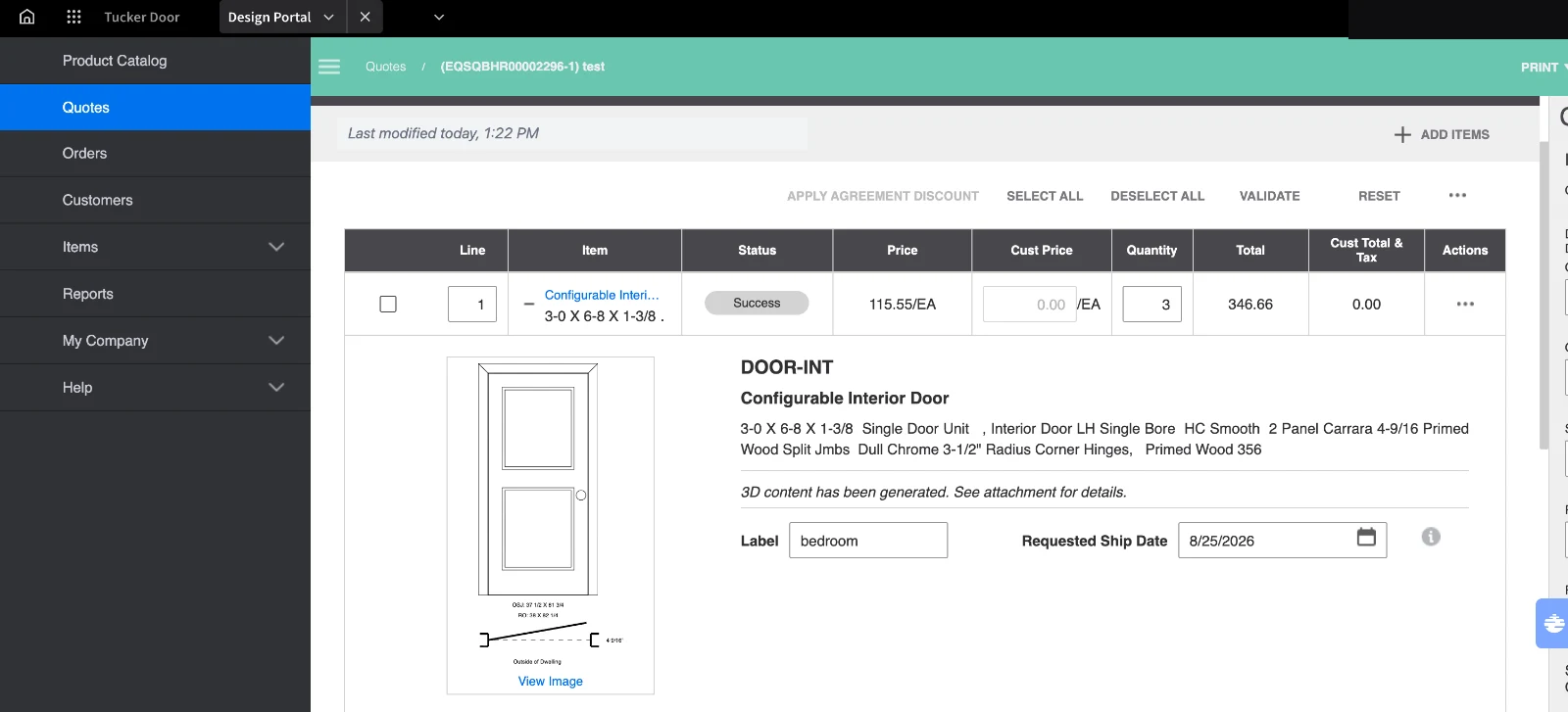
Build the item online to your specifications. The configurator renders an accurate spec drawing in real time, so you can change it as you go, add components, create multiple versions, and save the configurations you use most.
02
Quote
Turn the design into a detailed quote and save it to your dashboard. Previous quotes, past designs and reports all stay in the portal, and you can generate a customer-facing quote with your own branding and pricing.
03
Order
Submit it straight to the Tucker team to begin processing. No re-keying, no separate paperwork, and the spec drawing goes with it.
Changes can be made right up until the order is placed.
Production status
Watch it move to the truck.
See the status of every order you have with us, pull proof of deliveries, and download invoices without picking up the phone. Ask your Tucker sales rep to switch it on for your account.
Quoted
Saved to your dashboard
Ordered
Submitted to Monroe
In production
Machined and assembled
Loaded on truck
On a regular route
Delivered
Proof of delivery on file
In the portal
What you can do in it.
Live spec drawings
A dimensioned drawing renders as you configure, so you catch a wrong swing or a bad sidelite before it becomes a return.
Price as you pick
Every option is priced the moment you add it, at your pricing. No waiting on a quote to find out what a glass upgrade costs.
Your branding on the quote
Generate a customer-facing quote with your logo and your margin already in it.
Saved configurations
Save the units you build most and start from them next time instead of rebuilding a standard opening from scratch.
Proof of delivery and invoices
Pull a POD or download an invoice yourself rather than calling to ask for a copy.
Multiple versions
Build alternates side by side for the same opening and let the builder pick.
Getting started
Sign up and get your portal invite.
If you would rather have someone walk you through it, we will. Training and real people who know the product. Not a dealer yet? See how to open an account ▸
Get Design Portal access